It always feels so good to finish the last concert of the school year. Mine was last week. I usually have my final concert sometime during the 2nd week of May. That leaves about 1 1/2 weeks of school where students will still need to learn and play in class. One student came to my class after the concert was over and said, 'Can't we just watch a movie every day until school ends?' Students are feeling done with school, but I have to keep them busy or the last 2 weeks will be torturous. Sometimes, it gets hard to fill the time. Last year, I had students work as a class and in small ensembles from the Fiddlers Philharmonic and Jazz Philharmonic books to learn new styles. This year, I am having students work on sight-reading skills.
To begin, I show students the SRMachine App (using my iPad) by projecting the app on screen in front of the room using a projector.
I tell students that sight-reading is RHYTHM reading. If the rhythm is wrong, the music will not sound good, even if you play the correct notes. I demonstrate how to maneuver the settings of the app to adjust the music to our desired skill level. As a class, we pluck the rhythm on open D. It's super easy to do a few different examples and pluck the rhythm - and all students can do the rhythm, even if they don't read the clef that is used. If the settings are for violin, I next have the violins pluck the notes/rhythm while the rest of the class (who do not read treble clef, yet) plucks the rhythm on open D. I change the settings so that each section can take turns playing the notes while the other sections still participate by plucking the rhythms on open strings. My hope is that students will enjoy this enough to go purchase the app themselves and practice sight-reading at home.
After using the app, I gave students a worksheet to create their own sight-reading example. I told them to pretend that they were app developers and their job is to create sight-reading excerpts. They had to write it for their stand partner to perform. After completing the exercise, they would assess each other on their sight-reading abilities using the rubric at the bottom of the page. I walked around the room and made sure students were accurately writing rhythms, etc. Students seemed to enjoy the activity. For a follow-up, we practiced sight-reading orchestra music in class.
My district provides sample forms for reporting SLO outcomes, but I guess I am a more visual learner because I like to color-code my information so that I can easily see student progress and quickly identify students who may still need help. This year, I created SLO's for shifting and rhythm, but I was only required to do one for my assignment. At the start of the year, I gave my beginning orchestra classes a pre-assessment to determine their level of ability on rhythm and counting. Based on the results, I color code my class lists where I record scores. Using a highlighter, I color the names of the high level, mid-level and low level learners. As I record other grades and assignments, I can track each student to make sure they are progressing to higher levels of learning.
When turning in my SLO data, I like to visually see student progress throughout the year. Here are my SLO reports from this year. I blurred the student names for privacy reasons...but you can see the different colors and how I presented the data. (My pre-assessment and post-assessment tests have been posted previously on this site. Just do a search for SLO.)
The colored names on the left show student learning levels after the pre-assessment. The names on the right show the current level of the student after the final assessment.
Sometimes I stop conducting during a rehearsal and I watch my students. Do they notice that I have stopped conducting? Do they notice when they are falling apart? Do individuals notice when their tempo is different than everyone else's? Students can be so focused that they forget to listen and notice things happening in their surroundings.
A few summers ago, I took my kids to the local county fair and there was a 'ride' with giant inflated balls inside a shallow swimming pool. People could pay to get inside a ball and run around like a hamster. My children tried it and they had a great time. I attempted to get my kids' attention for a picture, but they were so focused on trying to stay upright inside the ball, they did not see or hear me. I share this story with my students and tell them not to play 'inside a bubble.' I remind them to listen and to perform as a team. The story helps, but students really need to practice listening and being attentive while performing. Here are a few ideas:
1. InTune
I recently purchased this app to use for ear training in my classes. It's very basic and easy to use. Two tones are played and you must decide whether the 2nd pitch is higher or lower than the first pitch. It starts pretty easy, but by level 5 it becomes tricky. To play it with my class, I plug my phone into my speakers and let students hear the pitches. They give me a thumbs up if they believe the 2nd pitch is higher and a thumbs down if they think the 2nd pitch is lower. I answer on my phone based on the majority. It is interesting to see student responses...many students really need this kind of training to develop a more refined sense of pitch. This game takes very little time, so it works great during a warm-up routine. Even though the game is simple, students have not been bored when doing this in class. Several of my students went home and purchased the app to try to get a higher score than me. After playing this game, I feel students listen more closely to intonation and pitch while rehearsing during class.
2. GlowSticks/Conducting
My students performed at a festival last week and the judges made comments to my class about how they need to listen to each other. They performed well, but almost fell apart in one section of the music because the back of the orchestra was a tiny bit behind the front. This is because I have 2 classes of beginners (100 total) and we do not have an opportunity to rehearse together. I teach the same music...we were just not able to combine for a rehearsal due to testing at the school and other teachers not allowing students to miss their classes. Both of my classes knew the music and could stay together in class. It's hard to see and hear when you find yourself in the back few rows of such a large orchestra. After the festival, I started to brainstorm ways I could help my students be more prepared in the future. A combined rehearsal would definitely help, but students must also learn to listen, count, and follow a conductor.
Recently I picked up a few cases of glowsticks and I had them in my office because I thought they might come in handy. As students entered class one day, I had them pick up one glowstick and place it on their music stand. We watched a quick video of the week about conducting and we discussed the purpose of a conductor:
After we were all settled, I turned out the lights and my classroom has no windows, so it was totally dark inside. In the blackness, I taught students how to hold their glowsticks like batons and I taught them how to conduct 4/4, 3/4 and 2/4 times. We could easily see when a student was not keeping the beat or moving the right direction because of the glowsticks. We practice following a conductor in the darkness. I directed various tempos and beats while students had to tap the glowstick on their hand in the air to stay with my beats. Students LOVED this exercise and even my advanced class was enthralled. It was a great visual - students could SEE whether they were together or not. I tried some pics, but it was dark, so it's hard to capture the true awesomeness of this exercise.
Here's a video with an example of students trying to stay with a beat...I was holding my phone and not conducting, so you can see they are not totally together:
3. Musical Chairs
On Friday, I could tell my students were getting tired of rehearsing our concert music yet again. We had already performed the music at festival, and we know it well. I wanted to have a productive rehearsal and listening skills were on my mind. To liven things up, I allowed all students to sit where-ever they wanted in the classroom. There were basses at the front of the room...violas, cellos, and violins all mixed up. We then played our concert pieces and it was like a new experience for students! They noticed other parts - melodies and harmonies. They made many insightful comments and agreed that it was easier to listen to each other when they were mixed up. They could hear themselves better with other parts around them. Students had to focus on playing their music exactly to fit with the other parts that were so close. I will definitely do this more often with my students. It allowed students to practice everything I wanted: listening, counting, awareness.
I hope you found something useful to help your classes learn to listen. Happy rehearsing, everyone!
I have written about GradeCam before (www.gradecam.com), but I haven't posted some of my latest ideas about using that resource in an orchestra class. My program has been growing, and grading takes me forever because I teach so many students. This year, I teach 260 students, and next year I'll have 280. Just grading simple assignments can take hours - and I'd rather be spending my time creating awesome lesson plans. Anything I can do to make grading easier makes my job better.
One thing I like about GradeCam is that you can change the bubble sheets to fit unique assignments. You would think that bubble sheets wouldn't work in a music performance class, but I found some fun ways to use them.
1. Bellwork
I frequently give my students bellwork - especially my beginning classes because I like them to have something to work on while I tune everyone. But, daily bellwork for many students means a LOT of after school grading. My bellwork assignments are very simple...they are just a way to check for understanding. I give students credit just for completing the work - even if it is wrong. If a student gets their assignment wrong, I try to pull them aside sometime the next day to re-teach or clarify and bring that student back on track. But, I'll be honest. Some days, I don't have time to get all of the bellwork graded. There have been days that I have not even looked at the answers on the bellwork and I have thrown them away. I realize that is diminishing my effectiveness.
GradeCam is a great solution to help me use my bellwork in the way I intend. It saves so much time on grading that I can quickly look through the papers and get help to students who need it. All I do is print the GradeCam blank score sheets - 4 per page. Student write answers to bellwork on the back of the paper and they fill out their score on the bubbles. Then my TA quickly scans each paper using my iPad and she is finished in minutes. I usually have a student TA to help me out at least one period per day, but if I didn't have a TA, I might have students scan their own paper as they leave the class as an exit procedure.
2, Note-reading? Who knew?
Since you can customize the bubble forms, it is pretty easy to create a form that has letters A-G for each question. Students can complete fast, easy note-reading assignments using these specialized forms. I just created a note-naming final using GradeCam. It was so easy to make because I didn't have to write individual questions. I used Finale to create a musical except containing all the notes I expect beginning students to know by the end of the year. The measure numbers correspond to the numbers on the bubble forms. GradeCam helps the actual grading go way faster, but it also provides me with very helpful data. For example, I can find out if a lot of students are getting the same notes wrong. I can then customize my lessons to help those students become strong on note-reading specific notes as needed. This would be super helpful for those doing a note-reading SLO. (I chose to do my SLO on rhythm this year.)
3. Rhythm, too?
After I created the note-reading assignment, I began to brainstorm ideas on how I could have students write counting using a GradeCam form. I came up with an assignment, but I haven't given it to my students, yet. I have enjoyed experimenting and coming up with new ideas to use this resource more frequently in my classroom. I customized this form using the 'number grid' option.
I'll write more about training students to use the GradeCam forms. I have found it to be quick and easy - but it is important that all students understand how to fill out the forms correctly to avoid issues with scanning.
I'm excited about the many possibilities of GradeCam to make my life easier. Happy grading, everyone!
Spring time is festival season for my orchestra classes and every day we work extra hard to perfect our pieces. A couple weeks before festivals, I change the format of my rehearsals so that I am not teaching new concepts and we focus only on our concert music. I try to keep the class working intensely while keeping a quick pace to make as much progress as possible . I appreciate the work that my students do in my class. I want them to learn to work hard, but I also want them to have fun. After a long week of diligent practice, I played a simple game with my classes to re-energize them and get them ready for yet another rehearsal.
This game is super simple, but it changed the atmosphere of my class to be fun and it helped students to re-commit to do their best. For the game, I asked questions to a student volunteer. The student was only allowed to answer with one word ...a word that I selected....and they had to say that word without smiling and laughing. We talked about how intensely one must concentrate and focus in order to NOT smile. For example, one word might be 'sausage.' I asked questions, and the student had to say 'sausage' in response to every question. Other funny words could be: pickle, dandruff, slugs...
After I demonstrated the game by asking a few students questions, I wanted to entire class to have the opportunity, so I let stand partners ask each other questions. It was so fun to watch my students interact with each other and have fun for a few minutes. We all needed a few minutes to laugh. It's a silly game, but students really took the message to heart. They were able to concentrate and work through another rehearsal and they did a great job.
This is my daughter. She has fiery, naturally curly hair and a spunky personality. At the age of 2 she was coming with me to her older's brother's violin lessons every week. She watched carefully, and within a year, she was wanted to start taking her own music lessons. So, she began learning the cello at age 3. She learned the bow hold very quickly and was soon a master at the Suzuki 'bow games.' Next, she learned to hold a cello and that's when her fiery personality starting shining. She did not like the way the cello felt sitting against her chest. It bothered her and she was having melt-downs over the discomfort. That's when I got crafty and created a 'cape' for her cello.
I let my daughter pick out the material for her cello cape. We filled the inside with soft felt, and sewed it together with a velcro attachment to hook around the neck and under the fingerboard of her cello. Problem solved - she loved it and was then able to hold her cello properly. She is now almost 12 years old and has progressed through various sizes of cellos, but she still uses her cello cape!
Sometimes my beginners complain about the same issue....some students don't like the feeling of the cello sitting on their chest. I have often wished I had some cello capes available at my school to help students feel more comfortable when playing the cello. Then something crazy happened....I have never seen this happen before, but last week, one of my excellent advanced cellists told me that he bruised his rib with his cello and would not be able to play until it healed. I wanted to help my student, so I had my daughter make a cello cape for him over the weekend. Today, I brought my student his cape and he loves it! I am going to have my daughter make more - she loves to sew and is interested in starting an Etsy store to sell cello capes with custom fun fabrics. This might help many young cellists - plus, it's kind of cool that cellos can have capes. :)
This week, I wanted to focus on quality sound/tone. I began with a video of the week to introduce the idea of clean, strong tone. We listened only to the music...I didn't let the students see who was playing the music. Then after a couple minutes, I turned on the projector and students were shocked to see a very young child creating amazing tone on the violin.
Next. I told students that they could create an equally powerful tone. We talked about times we have heard our voices in a video or in a recording. So many people believe their voice sounds different when they hear it in a video. Students relate to this...maybe said they don't like how their voice sounds. I asked them if they like the sound of their instrument. It is so easy to focus so intently on fingering, that we forget to notice what we sound like. And we can so easily change our sound for the better!
Students next played 4 open D's with their best possible tone. They really listened...and wanted to do this more than once to get their very best sound. We talked about bow weight and bow speed. I told students to move their bow fast on quarter notes, twice as slow on half notes, and twice as slow again on whole notes. As we played warm-ups, students focused on bow speed and they listened to their sound. I demonstrated a tune played with only one bow speed. It was boring...and lacked clarity and volume. Students enjoyed experimenting with bow speed it made our warm-ups way more fun. My entire group sounded so much more mature after this activity - and I was happy to see some of my more timid students using more bow and getting a bigger sound.
There are times I have nagged my students to use more bow. After this activity, I see that asking for 'more bow' is not as effective as asking for faster bow speed. I will now focus on bow speed more often to help my groups develop powering tone.
Beginners can play in tune. Really...they can. And they WANT to play in tune. No one wants to sound bad. I learned this while studying the Suzuki method as my son (age 4) began his violin lessons. He was taught to place his fingers perfectly and he wasn't to pull his bow until his fingers were set. That means, we had to pause after every 'tukka tukka stop stop' to place the next note before pulling the bow again. With this careful practice, my son never had the chance to play out of tune. Soon enough, he developed the muscle memory to land his fingers in tune add we no longer had to pause between pitch changes. In a beginning orchestra setting, we may not be able to physically check and move each student's finger to the right place, but we can use tapes for a guide. Students in a classroom are older, anyway...and they need to learn how to monitor their own playing. When students are struggling to get pitches in tune, I have found it helpful to step back and use the Suzuki strategy. Set. pull, listen. Does it match - is it in tune?
Recently, I did a warm-up with my beginning orchestra class and it helped their overall intonation so much that I started doing it with all of my groups. We often warm-up with finger patterns and scales...this is just a new way to approach the patterns. We drilled only 3 notes at a time. In my experience, students are most often out of tune when playing half steps. This little drill helped students fix those intervals and they performed with better intonation through the entire rehearsal after playing it.
I don't have students read the sheet music for warm ups because I want all of their focus to be on their fingers, half steps, intonation, tone, bow placement. etc. They easily pick up on this simple warm-up by rote.
The other thing I have learned about beginners and intonation is that they sound a lot better when I tune them! This is pretty obvious, but I used to not tune them very carefully. I have 50 students to tune in each of my beginning class, so I'm in a hurry...I tune them all in 5 minutes or less. With tuner blaring, I used to tune via pizzicato. Then, after nagging my class to fix their intonation, I noticed that their D's and A's didn't match...and I had tuned them! I learned that I am not very good at tuning accurately when I use pizz. Now, I tune every kid's instrument using my bow...and wow...what a difference. You students just might be playing better than you think. Every now and then, I even tune my advanced class...just to make sure their instruments are perfectly in tune before we focus a rehearsal on intonation.
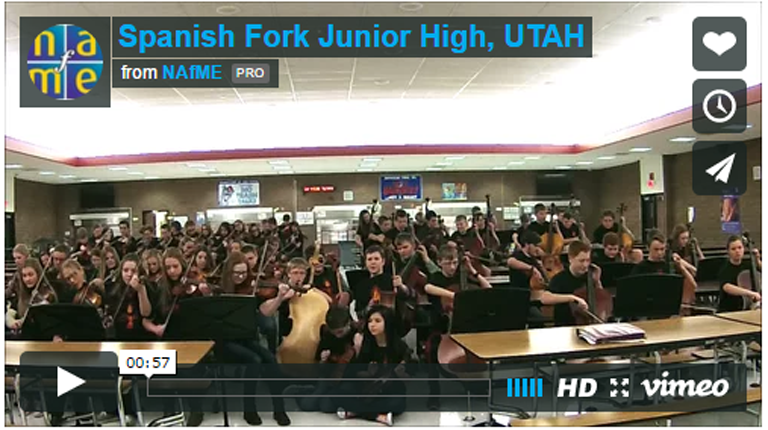
A few weeks ago, my 8th grade orchestra entered a video into the 'Music In Our Schools Tour' contest by the Give a Note Foundation. I just found out that we have been selected as a semi-finalist in the West division. This is so exciting for me and my students! It would mean a lot for us to win...and now we have a 50/50 chance.
Let me tell you a little about my program at Spanish Fork Junior High School in Spanish Fork, Utah. I started teaching at this school in 2012 after being a stay at home mom and having 5 children. In 2012, the orchestra program had 3 orchestras with 63 total students. Now in 2016, we have 215 students and I teach full time. Due to the rapid growth of the program, we are constantly in need of instruments. Currently, there are 2 students assigned to every school-owned cello. It makes our concerts a little crazy - passing around cellos back stage. If we win this contest, our school would receive a grant which would greatly help our growing orchestra program.
Your support and vote would really make a difference! It's easy to vote...just a click of a button and you can vote every day until Feb. 10. Please vote, share, post, etc!
I'm curious - what apps do you use in your classroom? It's always fun to discover new apps that help students 'get it.' There are so many apps I could highlight for this post, but I decided to just tell you about the apps I have used most recently in my orchestras class:
1. NINGENIUS
This app combines note-reading with matching correct fingerings. I like to show this app to my students as a way to practice their note-reading skills. Thanks to AirServer, it is now easier than ever to use iPads in the classroom. I mirror my iPad screen to my projector as students pass the iPad around the class and play the game. I haven't tried it yet, but I believe you can mirror multiple screens at once - that means I can give each section an iPad and we can play this game while competing by section. All students are included because everyone can see what is going on.
**This week, Ningenius is ON SALE! Check it out at the app store - it's half off until Friday!
2. TUNABLE
This is the app I use the most for tuning. I like that there are so many octaves to choose from. My bass players get a kick out of hearing the lowest octave E on this tuner. We don't tune to that low E, but it's fun to hear the different octaves. This app takes up less space/memory than the other tuning app I use: Tonal Energy Tuner.
3. MusicPal
I just recently discovered this app and I've been quite impressed by the potential for students. It's really easy to use - all you do is take a photo of sheet music. The app then digitizes the music. This could potentially help many students during practicing, because if they are unsure of a part in their music, they can take a picture and the app with play it back for you! You even make some minor adjustments in tempo and play along.
4. PREZI
Prezi's are very easy to create and free for educators. I like to use Prezi because of this little app! I can control the presentation from my phone...which frees me up to walk around the room as I teach my class. I transferred my powerpoint rhythm cards into Prezi to free up my movement.
5. iReal PRO
I'm still loving this app. I really need to use it more often. It's so nice to have back-up accompaniment tracks to make warm-ups more enjoyable.
6. Explain Everything
I used this app last week when I taught students how to count dotted quarter notes. This works much like any other presentation program, except you can draw on the screen while you are teaching. I project rhythms from my iPad to my projector and am able to write counting as I am teaching using a stylus. Very handy!
7. Rode Recording
A few months ago, I bought an iXY microphone for my iPad and I downloaded this free app to record my group. This last week, I recorded my class using a variety of microphones to find the best sound for an audition we were working on. This little microphone/app did a great job - and it was way less expensive than some of the other mics that I tested. I even ending up using one of these recordings for our audition.
I already shared the New Years practice assignment that I created for my high school orchestra. I thought I would also share the assignment that my beginning orchestra is doing this week. Once again, I customized the assignment to review and drill the skills we are working on in class.
Low 2's - F natural and C natural
Mixed finger pattern (F#, C natural)
Intonation - tuning with open strings
4th fingers for violin/viola
G scale
Learning to read G string notes
Preparing for a playing test: Minuet (Line 108 in the String Explorer book)
The part of the worksheet that has smiley/frowny faces is for practicing the D scale with different finger patterns. A happy face means to play F# (or C#) because it sounds happy. A sad face means to play F natural (or C natural) - which sounds sad.
I love how this is going and I think I will create this kind of practice assignment more often. My class has learned Minuet so much faster than in previous years and they have not seemed to struggle as much with the bowings. I expect some marvelous scores for my playing test on Friday. :)
I'll be heading back to class on Monday, just like many of you, and I will probably be greeting many students who have not done very much practicing over the break. My first priority is to get students back in shape! It's a perfect time to get down to basics and carefully drill technique such as finger patterns and bowing.
This video works great for introducing the week: GET FIT FOR THE NEW YEAR. We can talk about appropriate practice and how sloppy practice doesn't do any good...like eating junk food while working out at a gym.
I will be passing out the following assignment to my high school orchestra. They will be required to work on these exercises every day during the week as part of their practice routine. I customized the assignment (F Major, excerpts) to coordinate with the next piece we are learning - Andante from Symphony No 4 by Mendelssohn, arranged by Robert Frost.